Section 10.13 Repetition and References
We have already seen the repetition operator working on strings as well as lists. For example,
With a list, the repetition operator creates copies of the references. Although this may seem simple enough, when we allow a list to refer to another list, a subtle problem can arise.
Consider the following extension on the previous example.
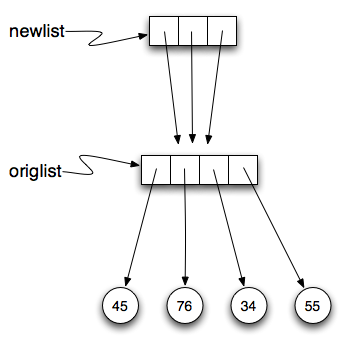
newlist is a list of three references to origlist that were created by the repetition operator. The reference diagram is shown below.
Now, what happens if we modify a value in origlist .
newlist shows the change in three places. This can easily be seen by noting that in the reference diagram, there is only one origlist , so any changes to it appear in all three references from newlist .
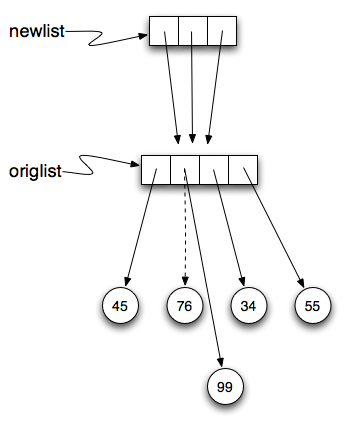
Here is the same example in codelens. Step through the code paying particular attention to the result of executing the assignment statement origlist[1] = 99 .
Checkpoint 10.13.4.
Activity: CodeLens 10.13.4 (reprefstep)
Check your understanding
Checkpoint 10.13.5.
[4, 2, 8, 999, 5, 4, 2, 8, 6, 5]
- print(alist) not print(blist)
[4, 2, 8, 999, 5]
- blist is changed, not alist.
[4, 2, 8, 6, 5]
- Yes, alist was unchanged by the assignment statement. blist was a copy of the references in alist.
What is printed by the following statements?
alist = [4, 2, 8, 6, 5]
blist = alist * 2
blist[3] = 999
print(alist)
Checkpoint 10.13.6.
[4, 2, 8, 999, 5, 4, 2, 8, 999, 5]
- [alist] * 2 creates a list containing alist repeated 2 times
[[4, 2, 8, 999, 5], [4, 2, 8, 999, 5]]
- Yes, blist contains two references, both to alist.
[4, 2, 8, 6, 5]
- print(blist)
[[4, 2, 8, 999, 5], [4, 2, 8, 6, 5]]
- blist contains two references, both to alist so changes to alist appear both times.
What is printed by the following statements?
alist = [4, 2, 8, 6, 5]
blist = [alist] * 2
alist[3] = 999
print(blist)